100th Blog Post: What I know about Software Development and Crisis Management

I started writing this blog post about this…

Opinions on policy and politics aside, this article on the struggles of healthcare.gov tells a classic tale of large software development project failures, and how not to react when trying to solve the issues.

But as I continued to write my thoughts, this became more about my views on software development and crisis management. So, enjoy (or ignore, or comment).

Hopefully, it is worthy of my 100th blog post (which this is).

On software development

  • Software development, no matter how much research is done on development methodology effectiveness, is as much art as it is science. Treat the artists like factory workers, and you get what you deserve.
  • Not all software developers are great at developing all applications in all languages, using all tools. Web development, especially when connecting to legacy systems, is a specific discipline. The best Web developers don’t work at large contract system development houses, in my experience. That’s usually because there are more interesting projects in the world for them to work on.
  • In software, one of the most common reasons for failure is complexity. For large projects like the one cited in the article, you have to work very hard to come up with an architecture that makes concepts and aspects of the application simple to extend and use. This is not cheap—it takes time and significant energy from artists to achieve. But, when it is achieved, it is a beautiful thing. You owe it to yourself to experience this at least once in your career.
  • Never ignore or otherwise skimp on quality User Experience Design (UXD). Never.
  • Designs change. New needs and unidentified technical risks are discovered. Requirements evolve. But if you want to get something done on time, quit changing the (in scope) requirements. If a good design forces you to re-write significant parts of your requirements, that is a good sign that you didn’t write effective requirements. In fact, they may not be true requirements at all. And, BTW, a list of features from a competitor’s brochure are not requirements. If you don’t how to write effective, (mostly) design-neutral requirements, learn. Start here. Then read this.
  • Well-written use cases—that everyone on the team has read and understands—solve a lot of problems. So does identifying the operating environment and performance goals sooner rather than later. Tip: Print this stuff out and hang on the walls were the developers and testers sit. Or (if you want to save some trees) make a JPEG of it and ask everyone to set it as their desktop wallpaper for the duration of the project.
  • Make developers create unit and integration tests for their code. Have them do code reviews with peers. Make them use code comments and consistently format their code. Make them fix their own bugs. Hold them accountable to the quality of software build they provide to the test team. Make them perform design checkpoints with their peers (or even customers) for any significant component. Anything less and they are not a serious professional developer.
  • Developing for security and performance are specific skill sets, but these are most often “want to” issues. As in, if a talented developer truly wants their product to be secure and fast, they will figure out how to make it happen.
  • Do daily stand ups. Make the product manager show up.
  • A good tester is as valuable as a good software developer. So is a good technical documentation person. They are artists too.
  • Give them all good, fast computers with at least two monitors and reliable Internet access. You want something done faster, remove inexpensive barriers.
  • Don’t make them pay for coffee. And don’t buy the cheap stuff.

On crisis management (in IT)…

  • The comment in the article about the “war room” is spot-on. I call it “the body cannon”. When **it hits the fan, there is usually some executive wanting to pull anyone and everyone off their current work and throw them at the problem, with no real plan. They are simply hoping that through volume, that the problem will be solved faster, when in fact it usually has the opposite affect. The better approach: select a small team of talented, trusted artists (that know the code!) and simply ask them: “What do you need?”, and then get it for them ASAP. Then, be prepared to pay the price of pulling these people off their current project (usually in the form of a schedule slip), once the crisis is over. These things are always about choices, not decisions.
  • Yelling at software developers doesn’t work. People that choose a career creating art by typing all day with headphones on are not the type that react well to yelling. If you don’t know how to convey a sense of urgency without yelling, the problem is you. If you don’t understand the problem or software really well, get out of the way.
  • If you have hired talented people, they can become heroes. Let them.

And, finally, if you are making an application for use in healthcare, take it seriously. Lives are at stake. It can still be fun and rewarding, but the problems within healthcare are large and demand our best efforts all the time. Now, go be great.

Article – Privacy guru knocks patient ID as ploy

I posted some thoughts recently about an article on impact of privacy on patient record sharing.

Now, here is an article that discusses the merits of giving the patient control over how they are identified and how their records should be shared.

Fundamental to this are the two approaches:

  • A formal managed infrastructure that provides (cross-)identification and record transport services (like eHealth Exchange, formerly NwHIN), or;
  • An ad hoc one that allows participants to send record information from point-to-point (ala the DIRECT or Blue Button Plus projects).

Some thoughts…

  • As I discussed with a respected colleague of mine at the recent ACR Informatics Summit, I believe that new standards like the emerging DICOMweb (aka QIDO-RS, WADO-RS, STOW-RS) and HL7 FHIR will more easily enable ad hoc exchange of records, but the role of more formal application infrastructures, like those defined by IHE XDS (and its domain specific variants, like XDS-I) will still be used where a mandate for managed patient records across a consortium exists (such as in Canada with the Canada Health Infoway).
  • As I mentioned in my prior post, society may have different motivations than those paying for the infrastructure and tools. This article attempts to express some of the concerns consumers may have about how their data is handled, which contrasts with the prior article’s statements about how “nobody under 30 cares about privacy”.

Article – CIOs push for patient ID progress

For those of you faced with connecting patient records with different patient ID domains across enterprises, or within an enterprise, this article is worth a read.

Some thoughts…

  • The need/want for privacy is not the real issue. The issue is the general lack of understanding in patient ID management and strategies for dealing with them.
  • I am interested to see what the ONC (through their new Patient Matching Initiative) does to solve this issue. Many enterprises have invested heavily to implement solutions (technical and staffing and policies) for dealing with multiple patient IDs. A new solution, however novel, will not be enthusiastically embraced by organizations that are committed to a path already.
  • Beyond cost and technical issues, there are societal ones. Not all people will be willing to be assigned a number by their government to track all their health data.
  • I believe observations that “nobody under 30 cares about privacy” are misguided and just wrong. It is true that younger people are more open about their social lives and personal interests, but that does not mean they want their sensitive health (or banking) information in the public domain.

Article – New HIPAA rule could change BAA talks

As this article explains, the rules of accountability need to apply to all parts of the delivery chain, from the healthcare provider to the infrastructure vendor.

It is my experience that the readiness of the vendor to provide the necessary security controls (technical, policy, etc.) is usually not the issue. It is often the healthcare provider staff that lacks the knowledge of appropriate and effective controls that prevents proper security from being in place.

For example, even when proper single sign-on (SSO) methods are available in systems, rather than taking the time to implement this between systems (which often requires some learning), staff will often default back to wanting to simply pass a user ID and password (often a generic one) from one system to the next, because that was all they could do 10 years ago to avoid having the user log into multiple systems.

Key Images are… well, key!

As I discuss key images with vendor and healthcare provider staff, I have come to the realization that they are not well understood. Let’s see if we can correct that.

What are key images?

In most contexts, they are images within a medical imaging exams that the Radiologist reviewing the exam wishes to indicate for others, such as the referring physician and clinicians, that they are important in understanding the diagnosis.

In other context, they may represent important images for teaching purposes, quality control, surgical planning or other purposes.

In any case, they serve some importance over other images in the exam and the user wishes to communicate this. That’s why they are ‘key’.

Who creates key images and how?

In the digital world, any authorized user can mark an image as a key image on any system that supports this function. Typically, this function is restricted to authorized users like Radiologists on systems like PACS; however, they may also be created by Technologists/Radiographers on modality workstations or clinical imaging systems, like an Enterprise Viewer in an EMR.

Key images are normally created in one of two ways:

  • Manually by selecting an image and choosing a key image method
  • Automatically by creating some other form of markup or measurement on the image (implying that it has some importance)

The latter capability is important as getting Radiologists to take the time to mark images as key is often difficult. And if they are not created, the consumer does not benefit from them.

Special case: In systems that allow the user to create spine labels, these should not result in automatic key image creation.

ACR 2013 – Patient Engagement for Radiology


Presentation by Dr. Alan Kaye (Advanced Radiology Consultants) at ACR 2013 Imaging Informatics Summit, quoting Dr. Rawsson: “It’s hard to put the patient at the center of the universe if you’re sitting there yourself.”

Culture of Patient Engagement

Articles: EHR Stress

The benefits will come, but we must get through the change and this will be painful. Think of the shift from film to filmless, and paper to paperless (with coded, structured records) is this, times a thousand.

Article: EHR copy and paste? Better think twice

When I think about how much effort is put into ensuring the right info gets associated with the right patient in standards and interoperable records, the thought that a patient’s clinical info could be “corrupted” through copy-paste by users is very scary.

EHR copy and paste? Better think twice | Healthcare IT News

PACS-centric vs. VNA-centric models for including imaging in the EMR

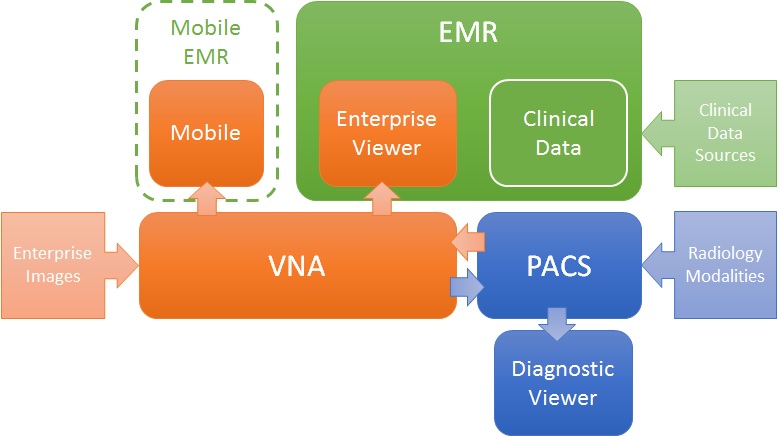
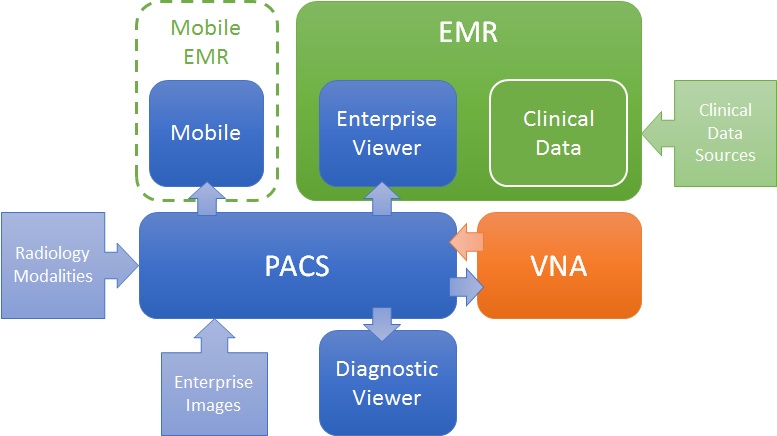
Like many problems, there are more than one valid solution. For the challenge of getting images to both diagnostic consumers (e.g. Radiologists) and clinical consumers (e.g. ordering physicians, EMR users), there are many ways to define a solution architecture, but two are most obvious: PACS-centric and VNA-centric.

PACS-centric

In this model, the PACS is the primary system, interfacing with modalities, providing a client to diagnostic users, as well as access to clinical users though an enterprise client embedded in the EMR. Mobile access may be direct or via a mobile EMR user interface, but it is getting images from the PACS. Enterprise images are captured and stored in the PACS (though storing to VNA and routing to PACS is also possible). The VNA’s role is primarily as an archive to (one or more) PACS.

PACS-centric

VNA-centric

In this approach, the VNA is the primary image management system. The PACS likely still interfaces with modalities (though not always), but captured enterprise images are stored to the VNA, and sent to the PACS when needed/supported. Clinical viewing in the EMR is done by an Enterprise Viewer, which may or may not be provided by the VNA vendor. Mobile access is also through the Enterprise viewer, getting images from the VNA.

VNA-centric

Pros and Cons

As stated, both are valid approaches, but each has some inherent strengths and challenges.

The PACS-centric solution has a high likelihood of having all parts of the medical imaging record being available in both diagnostic and enterprise viewers. Proprietary data (e.g. markups and key images) not provided through standard data objects (e.g. DICOM GSPS and KOS) are more likely to be visible in all clients. There may also be some common application configuration settings across clients, which would reduce administration complexity and cost. Getting the image management and image viewing (diagnostic and enterprise client) all working together is the burden of the vendor (i.e. it is an engineered solution designed to function as a single system).

The VNA-centric solution is better suited to support a multi-PACS environment, providing a common management and viewing platform for enterprise users—only the single Enterprise Viewer is embedded in the EMR (vs. the multiple ones provided by each PACS). Environments with multiple PACS and Mini-PACS benefit as the VNA is the common sharing (and data quality validation) point among them—this allows for a more “pluggable” solution where systems that address niche needs can be used until the primary PACS is able to replace them. In this model, the integration among the components is more complex and places a higher burden on the institution to get it all working (i.e. the informatics and IT staff need to be willing and able to put this together), even with purchased professional services from all the vendors involved.

Assuming both the PACS and the Enterprise Viewer support LDAP (Lightweight Directory Access Protocol) and/or SSO (Single Sign-On), user authentication may be equal in both approaches.

Both a well-designed PACS and VNA (and Enterprise Viewer) can provide effective multiple patient ID management methods (e.g. MPI or IHE Patient Identifier Cross-Referencing), to allow integration/exchange of patient imaging records across patient ID domains, though the VNA and Enterprise Viewer are traditionally more likely than PACS to support flexible models.

In both models, storage for the long term archive is expanded at the VNA.

FDA and New Cybersecurity Regulations

A friend forwarded this post to me.

Links worth checking out…

Here are my thoughts…

  • Frankly, security in healthcare devices ranges from embarrassing to terrifying—especially at the interface point between devices/systems. As more devices become network enabled, the level of risk is exponentially increased. Too often, software in medical devices are built by clinically focused developers, or hardware engineers tasked also with the software layer. Developing for security (and performance) is a specific skill set within software development, and it is not commonly found in the average developer. I have found that developers with experience in Web-based consumer applications (that manage personal data) and those with banking application experience generally “get it” more than others, but that’s just my experience. Also, product managers need to get a lot smarter about security and make it a priority in the product scope.
  • Regulations are brought in when industry fails to protect the public interest, and that is what is happening here. If the medical device industry was better at doing proper risk-based design and validation—which security and protection of data would certainly be an area of focus—and including risk mitigation controls in their designs, the FDA would not need to issue regulations. But, here we are. Now we get to see if government regulators can produce effective regulations, and keep pace with the ever-evolving security model best practices and methods.
  • Where the HIPAA Security and Privacy rule applies to the healthcare provider organization (that is, it is their responsibility), FDA regulations apply to the registered device manufacturer. Regulatory Affairs staff working for the vendor community are going to have to learn a lot more about cybersecurity. Most of the professionals in this field that I know, know very little about this topic. If you are a cybersecurity consultant that knows even a little about healthcare IT application design patterns and existing medical device regulations, this is a goldmine. Hmmm, maybe I will study this FDA stuff in more detail. 🙂