Brad Genereaux, co-chair of DICOM Working Group 27, posts on how to drive developer adoption.
Definitely worth a read (be sure to follow him if you work in healthcare IT).
Brad Genereaux, co-chair of DICOM Working Group 27, posts on how to drive developer adoption.
Definitely worth a read (be sure to follow him if you work in healthcare IT).
As Meaningful Use criteria advances to require sharing of population information with registries, this article explores some opinions on the readiness of public health agencies to accept and manage this data.
Is Radiology ready now? Check out all the ACR registries.
I started writing this blog post about this…
Opinions on policy and politics aside, this article on the struggles of healthcare.gov tells a classic tale of large software development project failures, and how not to react when trying to solve the issues.
But as I continued to write my thoughts, this became more about my views on software development and crisis management. So, enjoy (or ignore, or comment).
Hopefully, it is worthy of my 100th blog post (which this is).
On software development…
On crisis management (in IT)…
And, finally, if you are making an application for use in healthcare, take it seriously. Lives are at stake. It can still be fun and rewarding, but the problems within healthcare are large and demand our best efforts all the time. Now, go be great.
I posted some thoughts recently about an article on impact of privacy on patient record sharing.
Now, here is an article that discusses the merits of giving the patient control over how they are identified and how their records should be shared.
Fundamental to this are the two approaches:
Some thoughts…
For those of you faced with connecting patient records with different patient ID domains across enterprises, or within an enterprise, this article is worth a read.
Some thoughts…
As I discuss key images with vendor and healthcare provider staff, I have come to the realization that they are not well understood. Let’s see if we can correct that.
In most contexts, they are images within a medical imaging exams that the Radiologist reviewing the exam wishes to indicate for others, such as the referring physician and clinicians, that they are important in understanding the diagnosis.
In other context, they may represent important images for teaching purposes, quality control, surgical planning or other purposes.
In any case, they serve some importance over other images in the exam and the user wishes to communicate this. That’s why they are ‘key’.
In the digital world, any authorized user can mark an image as a key image on any system that supports this function. Typically, this function is restricted to authorized users like Radiologists on systems like PACS; however, they may also be created by Technologists/Radiographers on modality workstations or clinical imaging systems, like an Enterprise Viewer in an EMR.
Key images are normally created in one of two ways:
The latter capability is important as getting Radiologists to take the time to mark images as key is often difficult. And if they are not created, the consumer does not benefit from them.
Special case: In systems that allow the user to create spine labels, these should not result in automatic key image creation.
Presentation by Dr. Alan Kaye (Advanced Radiology Consultants) at ACR 2013 Imaging Informatics Summit, quoting Dr. Rawsson: “It’s hard to put the patient at the center of the universe if you’re sitting there yourself.”

Quote: “If you don’t like change, you are going to like irrelevance even less.”
Dr. Bibb Allen talking about the importance of accepting change to the practice of Radiology, explained the rationale behind the American College of Radiology’s Imaging 3.0 framework.

When I think about how much effort is put into ensuring the right info gets associated with the right patient in standards and interoperable records, the thought that a patient’s clinical info could be “corrupted” through copy-paste by users is very scary.
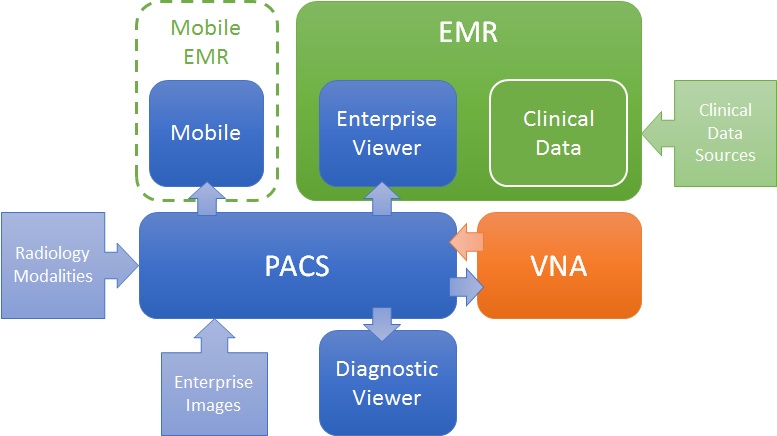
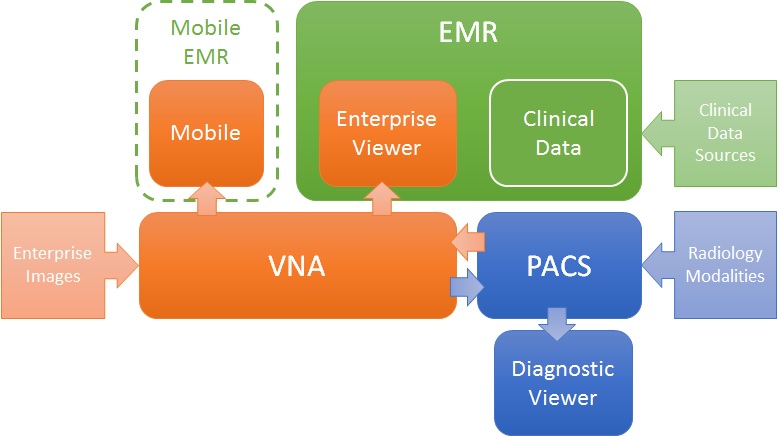
Like many problems, there are more than one valid solution. For the challenge of getting images to both diagnostic consumers (e.g. Radiologists) and clinical consumers (e.g. ordering physicians, EMR users), there are many ways to define a solution architecture, but two are most obvious: PACS-centric and VNA-centric.
PACS-centric
In this model, the PACS is the primary system, interfacing with modalities, providing a client to diagnostic users, as well as access to clinical users though an enterprise client embedded in the EMR. Mobile access may be direct or via a mobile EMR user interface, but it is getting images from the PACS. Enterprise images are captured and stored in the PACS (though storing to VNA and routing to PACS is also possible). The VNA’s role is primarily as an archive to (one or more) PACS.
VNA-centric
In this approach, the VNA is the primary image management system. The PACS likely still interfaces with modalities (though not always), but captured enterprise images are stored to the VNA, and sent to the PACS when needed/supported. Clinical viewing in the EMR is done by an Enterprise Viewer, which may or may not be provided by the VNA vendor. Mobile access is also through the Enterprise viewer, getting images from the VNA.
Pros and Cons
As stated, both are valid approaches, but each has some inherent strengths and challenges.
The PACS-centric solution has a high likelihood of having all parts of the medical imaging record being available in both diagnostic and enterprise viewers. Proprietary data (e.g. markups and key images) not provided through standard data objects (e.g. DICOM GSPS and KOS) are more likely to be visible in all clients. There may also be some common application configuration settings across clients, which would reduce administration complexity and cost. Getting the image management and image viewing (diagnostic and enterprise client) all working together is the burden of the vendor (i.e. it is an engineered solution designed to function as a single system).
The VNA-centric solution is better suited to support a multi-PACS environment, providing a common management and viewing platform for enterprise users—only the single Enterprise Viewer is embedded in the EMR (vs. the multiple ones provided by each PACS). Environments with multiple PACS and Mini-PACS benefit as the VNA is the common sharing (and data quality validation) point among them—this allows for a more “pluggable” solution where systems that address niche needs can be used until the primary PACS is able to replace them. In this model, the integration among the components is more complex and places a higher burden on the institution to get it all working (i.e. the informatics and IT staff need to be willing and able to put this together), even with purchased professional services from all the vendors involved.
Assuming both the PACS and the Enterprise Viewer support LDAP (Lightweight Directory Access Protocol) and/or SSO (Single Sign-On), user authentication may be equal in both approaches.
Both a well-designed PACS and VNA (and Enterprise Viewer) can provide effective multiple patient ID management methods (e.g. MPI or IHE Patient Identifier Cross-Referencing), to allow integration/exchange of patient imaging records across patient ID domains, though the VNA and Enterprise Viewer are traditionally more likely than PACS to support flexible models.
In both models, storage for the long term archive is expanded at the VNA.
 Don K Dennison, CIIP, FSIIM