Reflections on RSNA 2013

I have attended the RSNA show for over a decade, but always as a vendor. My days consisted of many meetings with many customers of varying needs, trying to convince them that the products that our company made were superior to those offered across the aisle by the competitors.

This year was my first year as a consultant. I attended on behalf of clients, meeting with several vendors to discover how their solution could help my client meet their business and clinical objectives.

In short, I was on the other side of the fence for the first time. And it was enlightening.

First, as a vendor, you are on your feet for hours, actively listening, talking, and demonstrating software or presenting information at a high energy level. It is exhausting and your body feels it by the end of the show.

As an attendee, representing a recognized and respected healthcare institution, I had a much different experience. Upon arrival at the vendor’s booth, we (I was accompanied by one or more representatives from the hospital), were led to the comfy couches. We were offered water or coffee or a latte. Everyone was attentive and polite. I would be lying if I said that I did not enjoy this more than the grueling schedule of vendor staff (do thank them when you see them—they work very hard at RSNA).

My personal user experience aside, I had some observations on the way vendors manage the interaction with a potential (or existing) customer.

Caveat: I am not a sales person and have not been one in any capacity since working retail just out of high school. I do not profess to be a sales expert, but I have observed some of the best and worst at their craft, so I know some things about the art of selling.

Observation #1: Vendors do not ask enough questions

I thought this was Sales 101. Qualify the lead.

What problem are they trying to solve? Why did they come to the booth? What are they trying to learn/accomplish during the appointment? Where are they in the buying cycle? Do they have budget? Who is involved in making a decision? What solutions are under consideration?

It did vary from vendor to vendor, but I was amazed at how few questions were asked. Most just went right into their pitch, often trying to convince us of something that we already knew or believed.

Observation #2: Vendors fail to understand the roles of the people in the meeting

Vendors need to remember who the actual buyer is in the meeting. In every meeting, we clearly defined our titles and roles. I was always identified as a consultant. My client representatives were of roles that make buying decisions, yet in some meetings, the sales person made all their eye contact, and spoke directly, with me. In one case, they did this so much, I felt awkward for my client—they were practically ignored. Consultants may be decision influencers, but when you have an actual decision maker in the meeting, pitch to them.

Observation #3: Vendors don’t prepare well enough for meetings with existing customers

If you are a vendor that already does business with the customer, be prepared for the meeting. Know the outstanding issues that customer is having. Know which of your company’s products are installed there and what version they are on. Know the basic installation details (e.g. physical deployment) and which user communities are using the product.

If you don’t know these things, asking them in the meeting does not instill confidence in the customer, especially if there are some outstanding issues to be resolved.

And don’t tell the customer that they are the only one having these problems. It only makes them feel worse.

Observation #4: Solutions are stabilizing

I didn’t see anything that really amazed me. As a person involved mostly in product definition and development with a vendor, we were always told (often by sales people) that everyone else had amazing products and that we were so far behind. In my experience, the solutions offered in various categories do vary in their strengths, but none are abjectly poor at what they are intended to do.

The quality of sales professional varied more than the quality/functionality of the products offered, quite frankly.

In seeking solutions, it is not so much about finding the best product, but the product that fits the institution’s needs the best. Which requires that you know what those needs are, of course.

Observation #5: Analytics are evolving; So are monitoring solutions

Lots of vendors are offering some form of analytics package. Especially those offering products to optimize workflow (they get lots of info that they can make use of in those HL7 messages).

System monitoring is improving, but still have a ways to go. I think customers need to become better educated as to what is possible with a well-designed system monitoring solution, and the benefits (so that they can get the budget approval needed to put it in place).


RSNA 2013

Following a trip that could have been taken straight from the movie Planes, Trains and Automobiles, I have finally arrived in Chicago for yet another RSNA. Will be meeting lots of colleagues and new folks. Will put up a summary of observations later this week.

Article – Registries playing catch up with Stage 3

As Meaningful Use criteria advances to require sharing of population information with registries, this article explores some opinions on the readiness of public health agencies to accept and manage this data.

Is Radiology ready now? Check out all the ACR registries.

Key Images are… well, key!

As I discuss key images with vendor and healthcare provider staff, I have come to the realization that they are not well understood. Let’s see if we can correct that.

What are key images?

In most contexts, they are images within a medical imaging exams that the Radiologist reviewing the exam wishes to indicate for others, such as the referring physician and clinicians, that they are important in understanding the diagnosis.

In other context, they may represent important images for teaching purposes, quality control, surgical planning or other purposes.

In any case, they serve some importance over other images in the exam and the user wishes to communicate this. That’s why they are ‘key’.

Who creates key images and how?

In the digital world, any authorized user can mark an image as a key image on any system that supports this function. Typically, this function is restricted to authorized users like Radiologists on systems like PACS; however, they may also be created by Technologists/Radiographers on modality workstations or clinical imaging systems, like an Enterprise Viewer in an EMR.

Key images are normally created in one of two ways:

  • Manually by selecting an image and choosing a key image method
  • Automatically by creating some other form of markup or measurement on the image (implying that it has some importance)

The latter capability is important as getting Radiologists to take the time to mark images as key is often difficult. And if they are not created, the consumer does not benefit from them.

Special case: In systems that allow the user to create spine labels, these should not result in automatic key image creation.

ACR 2013 – Patient Engagement for Radiology


Presentation by Dr. Alan Kaye (Advanced Radiology Consultants) at ACR 2013 Imaging Informatics Summit, quoting Dr. Rawsson: “It’s hard to put the patient at the center of the universe if you’re sitting there yourself.”

Culture of Patient Engagement

Imaging 3.0 at ACR Annual Imaging Informatics Summit

Quote: “If you don’t like change, you are going to like irrelevance even less.”

Dr. Bibb Allen talking about the importance of accepting change to the practice of Radiology, explained the rationale behind the American College of Radiology’s Imaging 3.0 framework.

Imaging 3.0 - Dr. Bibb Allen

PACS-centric vs. VNA-centric models for including imaging in the EMR

Like many problems, there are more than one valid solution. For the challenge of getting images to both diagnostic consumers (e.g. Radiologists) and clinical consumers (e.g. ordering physicians, EMR users), there are many ways to define a solution architecture, but two are most obvious: PACS-centric and VNA-centric.

PACS-centric

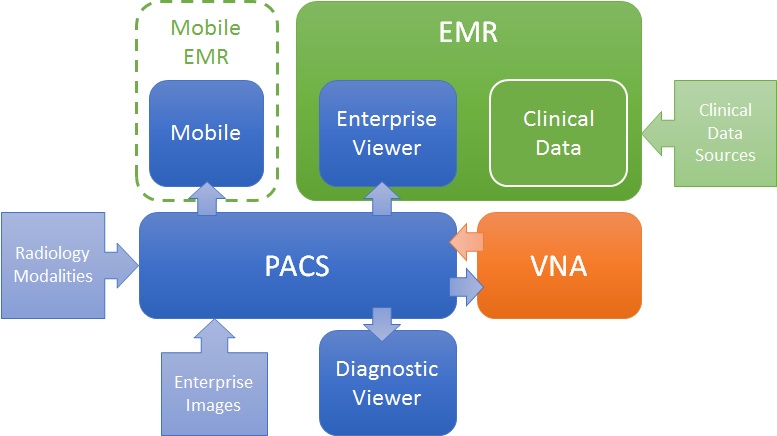
In this model, the PACS is the primary system, interfacing with modalities, providing a client to diagnostic users, as well as access to clinical users though an enterprise client embedded in the EMR. Mobile access may be direct or via a mobile EMR user interface, but it is getting images from the PACS. Enterprise images are captured and stored in the PACS (though storing to VNA and routing to PACS is also possible). The VNA’s role is primarily as an archive to (one or more) PACS.

PACS-centric

VNA-centric

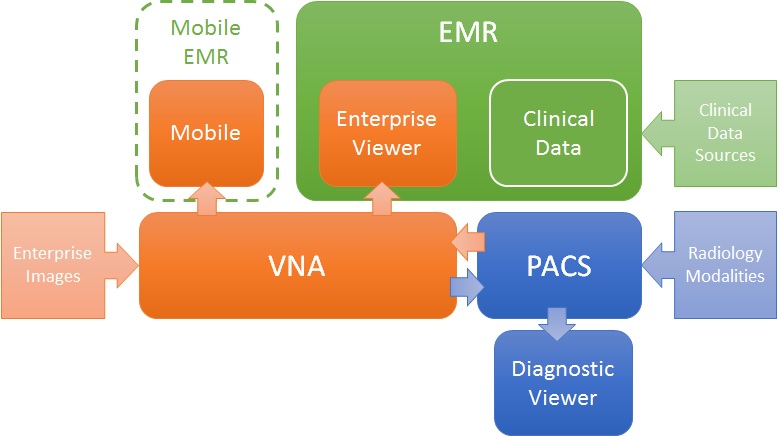
In this approach, the VNA is the primary image management system. The PACS likely still interfaces with modalities (though not always), but captured enterprise images are stored to the VNA, and sent to the PACS when needed/supported. Clinical viewing in the EMR is done by an Enterprise Viewer, which may or may not be provided by the VNA vendor. Mobile access is also through the Enterprise viewer, getting images from the VNA.

VNA-centric

Pros and Cons

As stated, both are valid approaches, but each has some inherent strengths and challenges.

The PACS-centric solution has a high likelihood of having all parts of the medical imaging record being available in both diagnostic and enterprise viewers. Proprietary data (e.g. markups and key images) not provided through standard data objects (e.g. DICOM GSPS and KOS) are more likely to be visible in all clients. There may also be some common application configuration settings across clients, which would reduce administration complexity and cost. Getting the image management and image viewing (diagnostic and enterprise client) all working together is the burden of the vendor (i.e. it is an engineered solution designed to function as a single system).

The VNA-centric solution is better suited to support a multi-PACS environment, providing a common management and viewing platform for enterprise users—only the single Enterprise Viewer is embedded in the EMR (vs. the multiple ones provided by each PACS). Environments with multiple PACS and Mini-PACS benefit as the VNA is the common sharing (and data quality validation) point among them—this allows for a more “pluggable” solution where systems that address niche needs can be used until the primary PACS is able to replace them. In this model, the integration among the components is more complex and places a higher burden on the institution to get it all working (i.e. the informatics and IT staff need to be willing and able to put this together), even with purchased professional services from all the vendors involved.

Assuming both the PACS and the Enterprise Viewer support LDAP (Lightweight Directory Access Protocol) and/or SSO (Single Sign-On), user authentication may be equal in both approaches.

Both a well-designed PACS and VNA (and Enterprise Viewer) can provide effective multiple patient ID management methods (e.g. MPI or IHE Patient Identifier Cross-Referencing), to allow integration/exchange of patient imaging records across patient ID domains, though the VNA and Enterprise Viewer are traditionally more likely than PACS to support flexible models.

In both models, storage for the long term archive is expanded at the VNA.

Post-SIIM 2013 Annual Meeting Reflections

Another great SIIM annual meeting is behind us and it was great, as always. I am going to post some thoughts and reflections this week.

Today, I have been thinking about analytics and, in particular, the use of a workflow engine and a standardized set of terms and definitions (such as what is being defined in SWIM) to ensure analysis of workflow events (type, timing, relationships, patterns, etc.) consistently across systems.

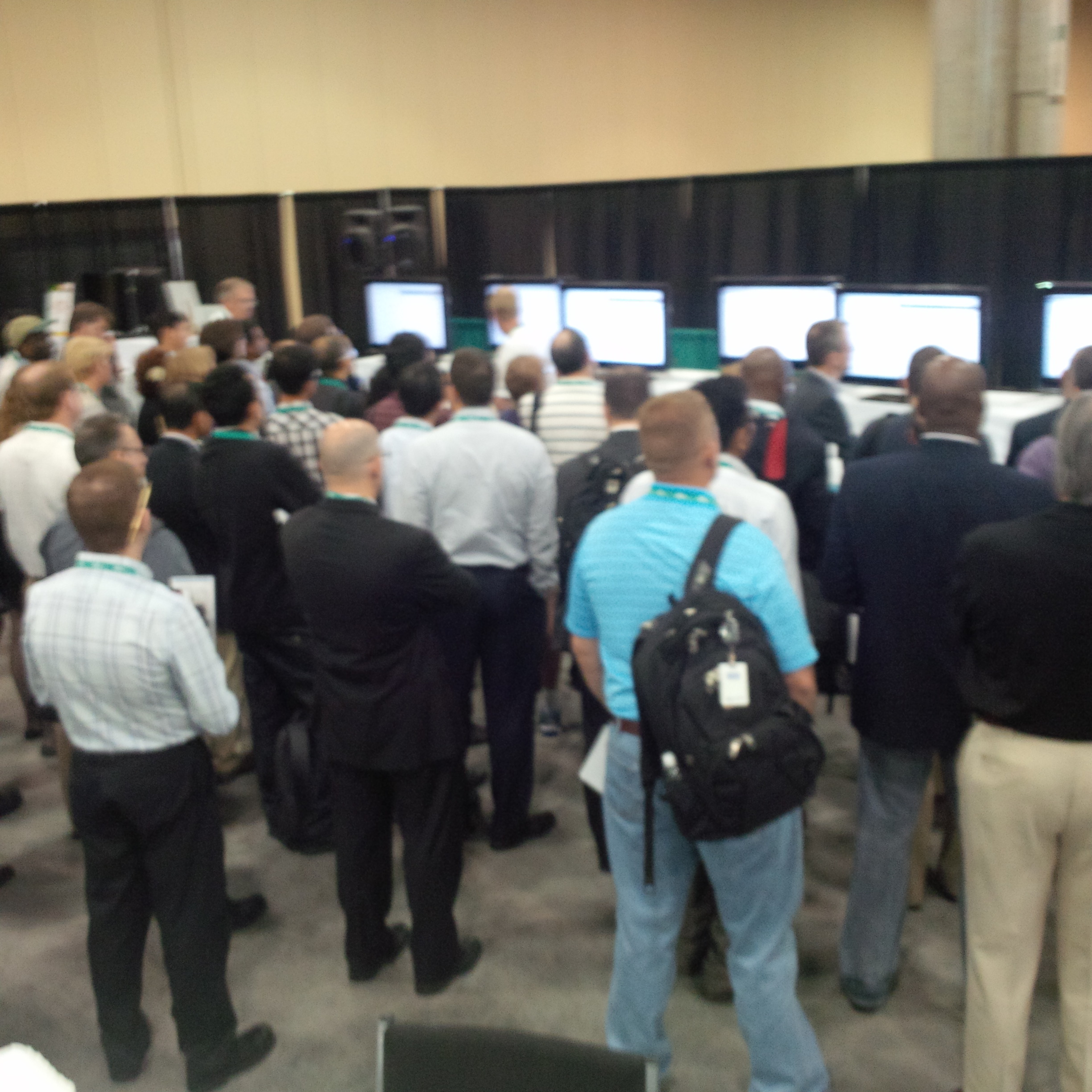
There were several great talks by Dr. Brad Erickson and Chris Meenan and others on the topic and these were followed by a large turnout of engaged attendees for a SWIM demo (see pic below).

...SWIM lessons
…SWIM lessons

My thoughts…

  • The use of a mature, off-the-shelf (open source or commercial) workflow engine has been considered by PACS and RIS vendors, with some attempting to use them in their product. It has not been widely adopted for two main reasons (I believe)…
  1. Most PACS from large vendors were bought, not built by them—the risk of replacing the built in logic with an external engine without introducing functional regression is high (read as: it would be expensive);
  2. Unless the workflow engine spans several systems, it would not have the full benefit (see more on this below).
  • The workflow examples cited often started with the arrival of the image objects from the modality (initial event that starts the workflow channel). Ideally, the workflow engine extends to before the order is placed, managing the order placement, decision support to ensure the right procedure is ordered, scheduling, protocoloing, and acquisition, along with the reading and post-processing steps. It should also span to the results distribution and archiving, managing the timing and destinations of the report and the lifecycle of the historic imaging data.
  • One of the limitations of using a parallel image management pipeline (e.g. sending images through a system before arriving in PACS) in order to detect the event that triggers the workflow can introduce some points of failure. Consider if the system integrated with the workflow engine goes down and images don’t get to the PACS—this outage would limit the value of the integrated image management and workflow engine system. A possible solution is to extend PACS and other systems, such as the RIS, EMR, CDS, VNA, Enterprise Viewer, document management system, etc. to expose the event information. This would allow the workflow engine to apply the desired workflow rules and orchestrate the data flow and work steps without being a potential bottleneck.

More thoughts from SIIM later. Stay tuned.

Article – Readers Write: 256 Shades of Grey(scale): The Dirty Little Secrets of Radiology and PACS

Contrary to what the title suggests, this article debates whether radiology has succeeded in solving the problem of going digital (by using PACS).

I believe that PACS solved the initial problem that it was intended to solve: get rid of film. Whether it provided more value than that had a lot to do with the design of the PACS, and who was managing it.

But, the value of PACS has a lot more to do with how it is deployed, configured and managed. If a PACS owner fails to use informatics and operational best practices, they and their users will suffer. If they fail to invest in and manage the infrastructure—such as the networks, servers, and storage—they will suffer.

I have seen too many PACS operators with too heavy of a dependence on their PACS vendor. Radiology and IT too often lack staff that understand informatics, integration best practices (e.g. as defined by IHE), or how their system operates. I have seen two hospitals with the same software application doing very similar exam volumes, and one experienced high levels of user satisfaction and operational excellence, while the other had chronic issues.

I would argue that in today’s mature PACS market, it is not what you buy, but how you use it. Provider staff need skills and knowledge about best practices. They need to know more about PACS in general, and be less constrained to knowing only what their PACS vendor tells them. And one of the best places to develop these skills and broad knowledge is SIIM.

I’ll be at the SIIM meeting—stop and say ‘hi’ if you see me.

Article – 9 ‘Cs’ lead to accountable care

Here is part one of an article outlining 9 ‘Cs’—five that directly concern the patient and four that are focused more on providers. Check it out.

Cheat list for the patient criteria…

  • Contact
  • Comprehensive care
  • Continuous, longitudinal, person-centered care
  • Coordinated care
  • Credibility and trust

…the provider criteria will be published later.

Thought: Much of the article describes physicians interacting directly with the patient. This is not common for Radiologists tucked away in a reading room.